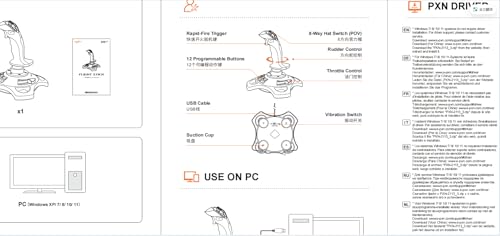
PC Joystick, USB Gaming Flight Simulator Game Controller with Vibration Function and Throttle Control, PXN 2113 Wired Gamepad Flight Sim Stick for PC/Computer(Windows Only, Not for Apple Devices/PS4/PS5/Xbox One/Switch)
About this item
- 【With Vibration Function】This flight stick is ONLY for PC/Computer and ONLY compatible with Windows 7/8/10/11 (Mac/Apple computers/Apple devices/PS3/PS4/PS5/Xbox One/Switch not supported).PXN2113 PRO gaming joystick for pc will never let you down with realistic fly experience. Compatible with many flight joystick pc games: World of Tanks,World of Warplanes,War Thunder,Assault Horizon,Microsoft Flight Simulator,X Plane 10,etc. Vibration Switch is at the bottom,please switch to“ON”.If less than 20%,you will almost not feel the vibration.Please set the vibration strength in the driver to 50% or higher for this joystick pc flight simulator.
- 【Immersive Fly Experience for Your Flying Dream】You can make the right moves with rapid fire trigger,4 axis controlling,8-Way hat switch and 12 programmable buttons of this computer joystick for gaming pc flight.Advanced software,Support various custom adjustment and keyboard mapping,enjoy exciting joystick flight simulator controls for pc games now! Not only a game, but also a dream of flying!
- 【FAQ】:Q1:Why doesn't it work on my pc/Xbox? A: It is ONLY for PC and Windows 7/8/10/11(Not for Mac/Apple devices/Xbox).Please turn on pc First and then connect with this joystick.If not,some pc may not identify it. Q2: How to install the driver? A: No need to install the driver and can play games directly.If you need driver,please find "Installation" section in manual or follow below steps: 1:Visit PXN official website→Support→Driver→Find PXN-2113PRO driver to download. 2:Extract the driver and install. 3:Plug joystick into PC USB port,pc will identify new hardware and install automatically. 4:Play games or set the joystick in driver.The drive can test and calibrate the pc flight joystick.
- 【Comfortable to Hold, Agile to Operate】This usb joystick for pc is with a solid and smooth feeling,very comfortable.Four power-grip suction cups at the bottom of this pc joystick for flight simulator pc games,they can fix firmly and easily when the table is smooth.Precise throttle control,Ergonomic design,Single hand control full function with this flight joystick for pc games.(Note:Force Feedback/Minecraft/Asphalt 8/Ace Combat 7 not supported).This Flight simulation pc controller with Friendly and Easy-to-Reach Customer Service.If any problem,please contact us directly(Contact Seller),Fengying will reply within 12 hours.
- 【Setup Guide for Microsoft Flight Simulator】For PXN 2113 flight sim joystick pc setup in Microsoft Flight Simulation,please refer to below images and follow below steps: Step 1: Launch the game and click"MENU.FLOWBAR_ OPTIONS",select“MENU.OPTIONS CONTROLS". Step 2: Except the keyboard and mouse mode, also have joystick mode in game.Please click“GENERIC USB JOYSTICK" to map the key. (Note:The joystick should be plugged into PC before this setting). Step 3: For function settings,take “INPUT.KEY_ _SWITCH_ CAMERA"as an example,scroll down to select“Select an input",click No.12 button,finally click“VALIDATE”to save.
Overview
- Brand: PXN
- Model Name: PXN-2113 Pro
- Compatible Devices: PC, Windows
- Controller Type: Joystick
- Connectivity Technology: USB
Couldn't load pickup availability
15 in stock
View full details

Reviews
-
⭐⭐⭐⭐⭐
Daniel Brooks — Austin, Texas
Questnory has a useful selection of gaming and tabletop accessories. I picked up a controller stand and a few desk organization items, and they helped make my setup feel much cleaner. The product descriptions were clear, and I would shop here again.
-
⭐⭐⭐⭐⭐
Emily Parker — Seattle, Washington
I ordered a few gaming accessories from Questnory, and everything fit nicely into my setup. The products were easy to use, arrived in good condition, and felt practical for everyday gaming. I especially liked how simple it was to browse different categories and find what I needed.
-
⭐⭐⭐⭐⭐
Jason Reed — Portland, Oregon
I ordered a playmat and a set of tabletop accessories from Questnory. The items were practical, easy to store, and added a nice touch to our gaming table. I also liked the variety of products available for both video gaming and tabletop play.
-
⭐⭐⭐⭐⭐
Lauren Mitchell — Denver, Colorado
I found several board game accessories that worked well for our weekly game nights. The storage items made it easier to organize cards, dice, and smaller pieces between sessions. The overall shopping experience was straightforward and convenient.
Trending Collections
-
PC Gaming Peripherals
Upgrade your gaming setup with PC gaming peripherals designed for smoother control,...
-
Controllers & Simulation Gear
Explore controllers and simulation gear designed to provide responsive input, immersive control,...
-
Gaming Audio & Streaming
Explore gaming audio and streaming equipment designed to improve communication, sound quality,...
-
Power, Cooling & Connectivity
Explore power, cooling, and connectivity accessories designed to keep compatible gaming devices...
FAQ
What types of products does Questnory sell?
Questnory offers gaming accessories, PC peripherals, controllers, streaming equipment, board games, card games, tabletop accessories, RPG supplies, miniatures, storage products, and gaming setup essentials.
How can I check whether a product is compatible with my device or game?
Please review the product description, model number, platform, dimensions, connector type, edition, and compatibility details before ordering. Compatibility may vary between console generations, operating systems, game editions, and device models.
How long does order processing take?
Orders require processing before shipment. Processing times may vary depending on product availability, order volume, and supplier handling. Tracking information will be provided after the order has shipped.
How can I track my order?
Once tracking information becomes available, it will be sent to the email address used at checkout. Tracking updates may take a short time to appear after the shipping carrier receives the package.
Will all items in my order arrive together?
Some products may be shipped separately depending on availability, package size, or fulfillment location. You may receive more than one tracking number when an order is divided into multiple shipments.
Can I change or cancel my order?
Contact us as soon as possible after placing your order. We will review the request, but changes or cancellations cannot be guaranteed once processing or shipment has begun.
What should I do if my item arrives damaged or incorrect?
Contact Questnory promptly with your order number, a description of the issue, and clear photos of the product and packaging. This information helps us review the problem and determine the appropriate next step.
Can I return a product if I change my mind?
Return eligibility depends on the item’s condition, return period, and the requirements listed in our Return & Refund Policy. Products should generally remain unused, complete, and in their original packaging.
Do board game expansions and accessories include the base game?
Not always. Expansion packs, upgrade kits, organizers, miniatures, and accessories may require a separately purchased base game. Please review the product title and description carefully before ordering.
How can I contact Questnory?
For order questions, product concerns, returns, or general assistance, email us at dasrtnhiomkl@gmail.com. Include your order number when contacting us about an existing purchase.
Blog posts
View all-
The Right Game Controller Can Change the Way Yo...
Learn how to choose a game controller based on platform compatibility, wired or wireless connectivity, layout, size, triggers, battery options, and gaming style.
The Right Game Controller Can Change the Way Yo...
Learn how to choose a game controller based on platform compatibility, wired or wireless connectivity, layout, size, triggers, battery options, and gaming style.
-
What to Look for in a Gaming Headset Before You...
Learn what to compare before buying a gaming headset, including compatibility, wired and wireless connections, comfort, microphone design, battery life, sound isolation, and controls.
What to Look for in a Gaming Headset Before You...
Learn what to compare before buying a gaming headset, including compatibility, wired and wireless connections, comfort, microphone design, battery life, sound isolation, and controls.
-
7 Board Game Storage Mistakes ThSmall Gaming De...
Discover ten practical ways to improve a small gaming desk with compact peripherals, vertical storage, monitor stands, cable management, charging solutions, and efficient equipment placement.
7 Board Game Storage Mistakes ThSmall Gaming De...
Discover ten practical ways to improve a small gaming desk with compact peripherals, vertical storage, monitor stands, cable management, charging solutions, and efficient equipment placement.